Free online SRT editor
Load an SRT file, fix timing, edit text, and check the result against professional subtitle standards. No upload, no account, everything runs in your browser. Built on 40 years of subtitle production.
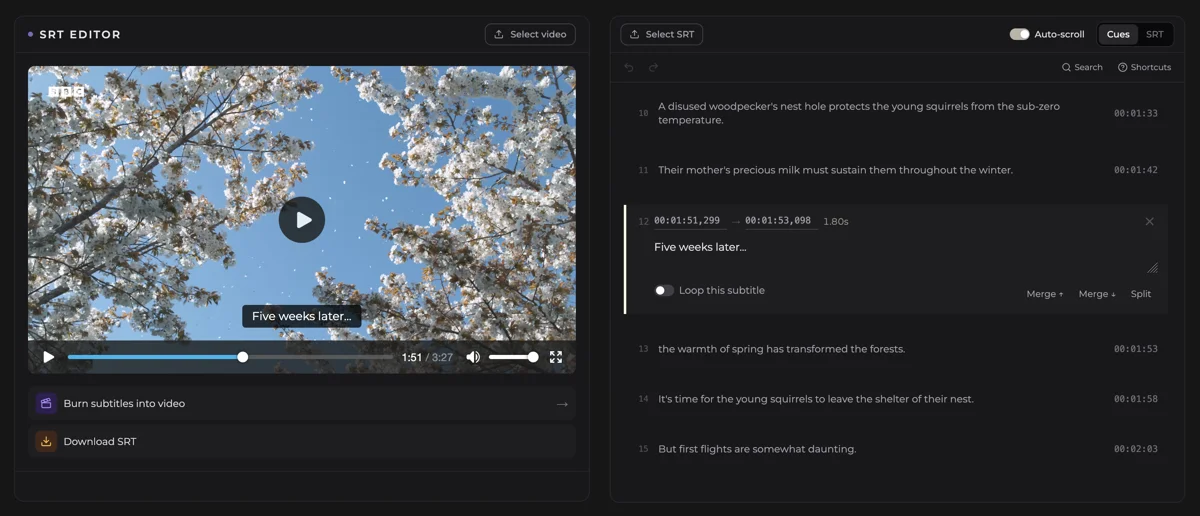
What the editor can do
Quality checks
Auto-fixes
Shift all subtitles
Split & merge cues
Add & delete cues
Two editing modes
Built on professional subtitle standards
Most SRT editors let you change text and timecodes and save the result. They do not tell you whether a viewer can actually follow it. This editor does. Each cue is checked against professional subtitle standards. The file receives an overall quality score from 0 to 100, and every problem shows what it costs. The score moves as you fix things, so you can see the file improve while you work.
Reading speed
How quickly characters appear on screen. When reading speed is too high, viewers cannot finish reading a subtitle before it disappears. It is one of the most common reasons subtitles feel rushed even when the transcript is accurate.
Reading speed standards →Line length and line count
Lines that run too long are harder to read on smaller screens and may overflow the frame. Professional broadcast standards also limit subtitles to two lines per cue.
Line length standards →Cue duration
Unusually short cues often go unread. Unusually long ones leave text on screen after the speaker has moved on. Both affect viewing comfort in ways that are easy to miss until playback.
Timing standards →These checks run on every cue as you work. Problems that would otherwise only appear during playback are caught at editing time, before you publish or burn the subtitles into a video.
These checks are based on the same standards applied in professional broadcast subtitle production. Subtitling.net has been working with subtitle standards since 1982.
Related readingWhy we built a free SRT editor→Common SRT problems the editor solves
- Subtitles out of syncAll cues are early or late by the same amount. Use the Shift timing tool to enter an offset in seconds. All timecodes update instantly. How to sync subtitles
- Overlapping cuesTwo cues active at the same time in the timeline. The editor detects every overlap and can resolve them with the auto-fix.
- Gap too small between cuesConsecutive cues with no visible pause between them. Flagged against the professional minimum gap standard.
- Wrong cue order or duplicate indexesCues out of sequence or with repeated index numbers. The editor re-sorts and renumbers the file automatically on import.
- Malformed timecodesMissing digits, wrong separators, or other format errors. The editor catches these when loading the file.
- Negative or zero-duration cuesA cue whose end time is at or before its start time. These cues never display on screen. Detected and flagged automatically.
- Empty cues and stray whitespaceCues with no text content, leading spaces, trailing spaces, and double spaces. All flagged as errors and cleaned in one click.
What is an SRT file?
SRT (SubRip Subtitle) is a plain-text subtitle format. Each cue has a number, a start and end timecode, and the subtitle text. It is the most widely supported subtitle format and works with YouTube, Vimeo, VLC, and most video editors. The format has strict requirements: timecodes must use a specific notation (hours:minutes:seconds,milliseconds), each cue must be separated by a blank line, and indexes must be in sequence. Small formatting errors can cause the file to fail in video players or editors.
Frequently asked questions
How to edit an SRT file
Load your SRT file
Click Load SRT to import your .srt subtitle file.
Load your video (optional)
Click Load video to preview subtitle timing against the video while you edit. The editor works without a video too.
Edit timecodes and text
Use blocks view for structured editing, or switch to raw SRT view to edit the file directly. Quality issues are flagged on each cue as you work.
Fix sync if needed
If all subtitles are off by the same amount, open the Shift timing panel and enter the offset in seconds. Changes update live.
Nudge timing precisely
Arrow keys on any timecode field shift timing in 100 ms steps.
Download the result
Click Download .srt to save your edited file.